Work System Management
In the business system management screen, the business system (API Key) that calls the SDF API is registered and managed on a slot basis.
You can register within the scope of the number of assigned work systems (quota) for the license, and an API KEY will be issued upon registration.
1. List Screen
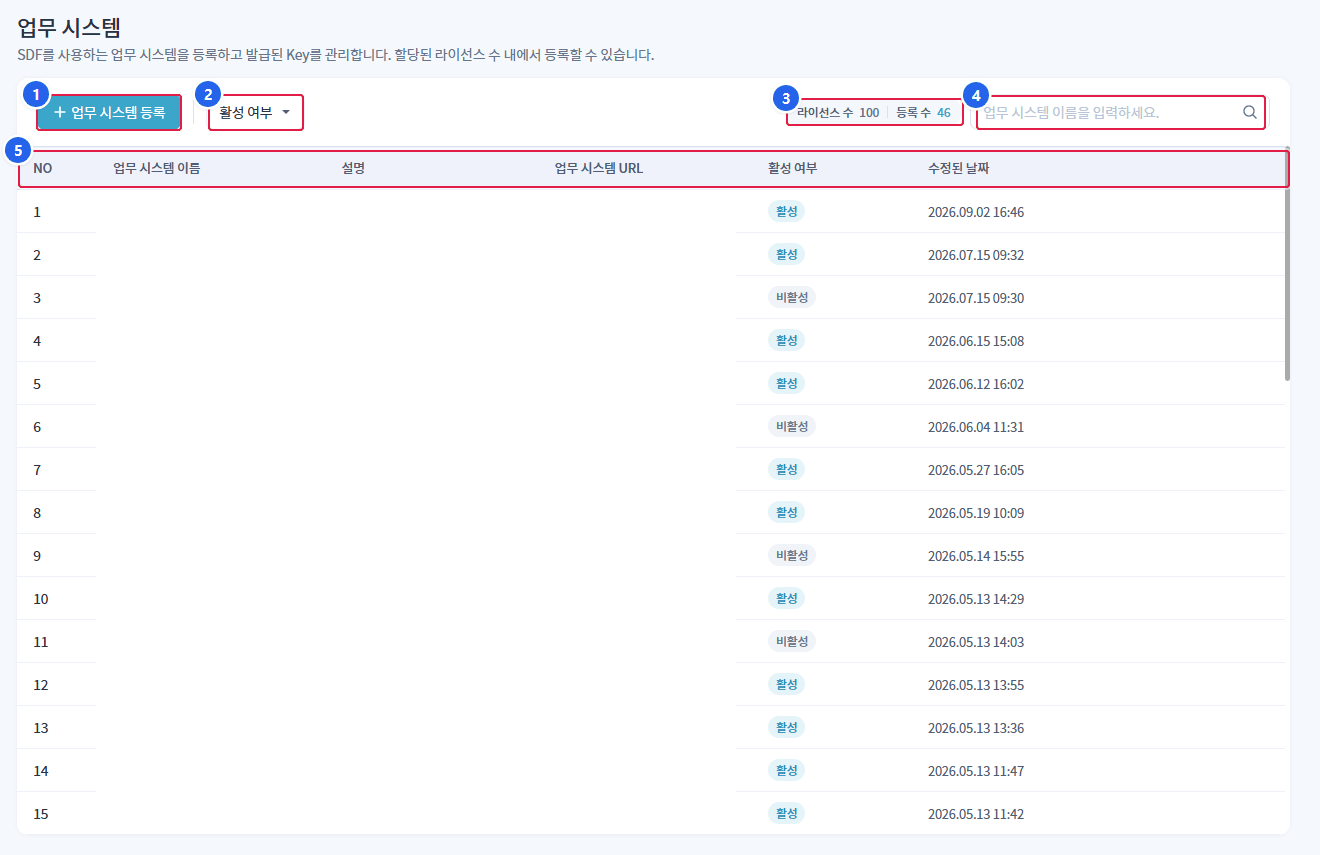
1. Business System Registration
- Open the new business system registration panel.
2. Active Status Filter
- Filter the list by All / Active / Inactive.
3. License Count / Registration Count
- Displays the current registration status against the quota.
4. Search
- Searching by business system name.
5. List
- The registered task system is displayed in a table. Clicking on a row opens the detailed panel on the right.
1.1 List Table Structure
| Column | Explanation |
|---|---|
| NO | Number |
| Business System Name | Name of the work system |
| Explanation | Description of the work system |
| Business System URL | URL of the linked target system |
| Active status | Active / Inactive (indicated by chip) |
| Modified Date | Last modified date and time |
1.2 List Screen Features
| Function | Explanation |
|---|---|
| Work System Registration | Open New Business System Registration Panel |
| Active Status Filter | All / Active / Inactive Filters |
| Search | Search by business system name |
| License Count / Registration Count | Display registration status against the quota with the right badge |
| delete | Individual deletion in the row |
| Detailed View | Open the right detail panel when clicking a row |
In the following case업무 시스템 등록The button will be disabled.
- If you do not have registration permission
- If the license KEY is not registered or has expired
- If the number of registrations has reached the number of licenses (quota)
2. Business System Registration
업무 시스템 등록When you click the button, the registration panel will open on the right.
| Input Item | Explanation | Pharmaceuticals |
|---|---|---|
| Business System Name | Name of the work system | mandatory |
| Explanation | Additional explanation | Selection, up to 200 characters |
| Business System URL | Integration target URL | Required, http(s) format, no duplicates allowed |
| Active status | Active/Inactive Toggle | Default Active |
The business system URL must be unique, and already registered URLs cannot be registered again. Registration will be restricted if the format is incorrect.
2.1 API KEY Issuance
Once the registration is completeAPI KEY 발급A notification window will appear.
The issued API KEY isfirst time onlyYou can check it, and it will not be displayed again afterwards. You should copy and store it in a safe place. You cannot use the SDF API without an API KEY.
API KEY is used for authentication when external systems call the SDF API. If lost, reissuance is required, so please keep it separately.
3. Detail View and Edit
Clicking on the work system in the list will open the detailed panel on the right.
| item | Editability |
|---|---|
| Business System Name | Read-Only |
| Explanation | editable |
| Business System URL | Read-Only |
| Active status | editable |
| Modified Date | Read-Only |
Change the description and activation status.저장It will be reflected by the button. If the activation status is changed to inactive, the corresponding business system will not be linked to the security policy.
4. Deleting the Business System
detailed panel or list row in삭제Select __PH_0__. In the confirmation window, enter the name of the business system to be deleted to confirm the deletion.
If the business system is deleted, the issued API KEY will be immediately invalidated, and API calls to that system will be blocked. The deleted business system cannot be restored.